Last night, I tried publishing yesterday’s dev log from my home computer, which is not the computer I built the grammar checker system on. Alas, I ran into a problem where 160+ of my entries (aka, all of them) were marked for grammar review because the .grammar-checked-files.json containing hashes of all files that grammar checks had already been run on was included in the project’s .gitignore and therefore not available on that machine. I went through about 25 entries until I gave up and just manually pushed my changes.
Today, I looked in that JSON file and noticed that it was using the full file path for my content entries, which is something that needed to be remedied before removing it from my .gitignore. I decided to give the new GLM-5 model a shot in Kilo Code since they’re doing a promotion where it’s free. The LLM took its sweet time to complete the task, but it ended up doing a great job. It even went beyond the scope of my request and fixed a similar issue in my tagged files tracker. On one hand, I’m impressed; on the other, I’m peeved it didn’t ask permission. Perhaps this is something related to Kilo Code’s configuration. I’m sick of installing new programs and extensions all the time, but perhaps I’m just being lazy. Free ain’t ever free.
Back to the grammar checker—one of the things I noticed last night while reviewing old, unchecked entries was that it kept trying to move punctuation after quotes inside the quotes. I understand that in American grammar, this is conventional, but I prefer keeping quotes clean and not including periods or commas that aren’t part of the actual quoted text. I tried adding an extra instruction to the prompt being passed to my grammar reviewer LLM:
”Follow New Hart’s Rules for punctuation placement with quotation marks: place commas and full stops OUTSIDE closing quotation marks unless they are part of the quoted material itself. Do NOT move punctuation inside quotation marks”
Despite this seemingly clear instruction, I could not get my grammar checker to stop moving my punctuation inside preceding quotes.
Prompting may not provide a fix, but perhaps changing the model would. I like GPT 4o Mini though; it works well aside from this issue. Therefore, I should improve my system’s UX. Certain entries contain too many suggestions I want to override, so I need to come up with a simpler way to ignore a suggestion without needing to manually fix it in the text. I think the best way to do this would be to launch a browser page for each entry where I could hit buttons to quickly accept/decline suggestions.
Opus Prompt
“I’d like to improve my grammar checking system’s UX. Currently, when the system flags an entry for suggested corrections, it launches a text editor window where I need to manually edit the document and then save and close it to accept the changes. The issue is that when there are multiple suggestions i disagree with, it becomes tedious to undo those changes by manually replacing the corrections with the original text . I think a better experience could be had in a browser window. We could launch an HTML page where all the suggestions are shown in a list like they are currently, except that beneath each suggestion, there would be a checkmark button to approve and an X button to reject. The revised text suggestion could be given a text field so that if I wanted to make manual changes to the suggestion I could do so and then approve my changes by hitting the checkmark. The system shouldn’t finalize changes until I hit an “Finalize” button at the bottom. That button should be pressable even if I haven’t approved or rejected all suggestions—if pressed in this scenario, it should assume approval for those unlabeled suggestions. Hitting the finalize button could close the tab”
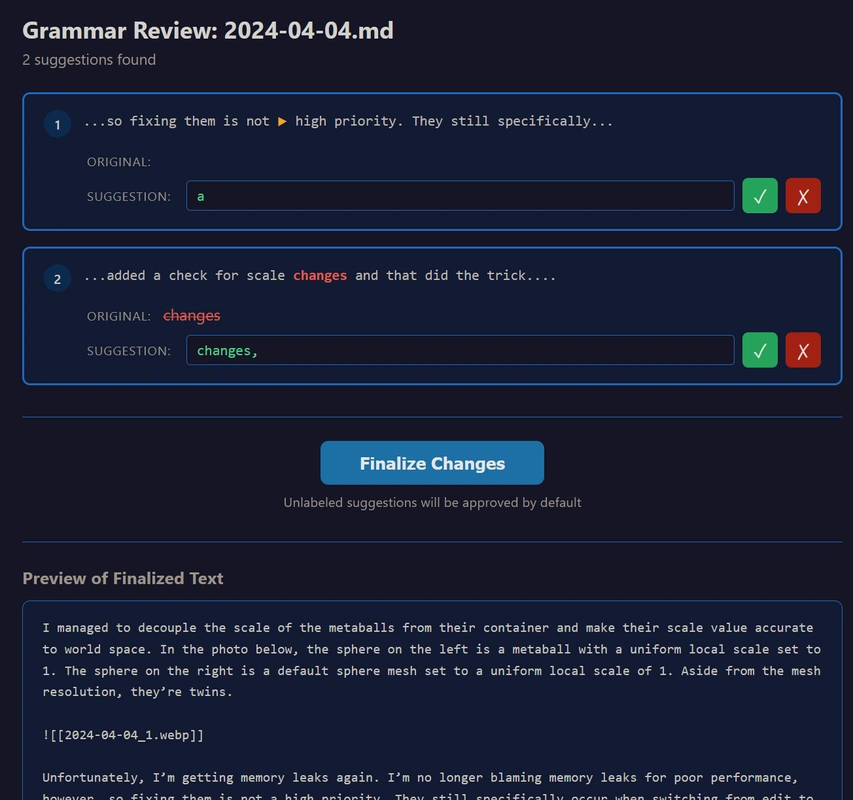
Now that’s a UI! I’ll report back once I’ve finished going through all unchecked posts with the grammar checker.
There were a few small bugs, and it took a few small hours to sift through all my flagged entries, but now I’m done! I can rest easy knowing that from now on, when my mom looks through this blog, she won’t be able to make any comments about incorrect grammar. Just kidding—my mom knows I have great grammar! But now I have PERFECT grammar! Besides, my mom doesn’t even read this blog because it’s too technical! Mwahahahaha…
I got tired of my blog looking so generic, so I changed the fonts to some more exciting ones. Swapping fonts is super easy with Quartz, but some Google Fonts break the CustomOgImages plugin that relies on satori, which still does not support advanced typography features such as kerning, ligatures and other OpenType features.
I also added a looping video clip on the homepage because visuals are a great way to add intrigue, and the homepage shouldn’t be so boring. Was somebody supposed to just read through a bunch of posts in order to figure out what the Interactive Energy Ball looks like? I guess they could check my GitHub or Instagram.
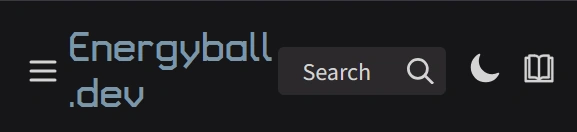
Finally, I improved the layout on mobile so the header wasn’t getting squished.