Today was one of those days when I started off distracted by listening to baseball analytics on YouTube while prepping to make my second-round pick in my fantasy baseball league’s First Year Player Draft. Lo and behold, I ended up in full YOLO mode and decided to challenge Claude with the task of properly building a runtime AnimationCurve editor for my in-game settings menu. This was something I attempted months ago, first with Sonnet 4.5 and then with GPT 5 Codex. There were some moral victories, but those attempts ultimately ended in failure. With how much LLMs have improved since then, and how much I’ve improved at using said models, I figured it was time to give this another shot—and, if possible, complete it in one shot too. It’s good to dream big.
Like in my previous attempt, I ripped all the internal curve classes from the UnityEditor.dll using ILSpy. Since this was a greenfield (fresh) project, I figured I’d save tokens and headaches by minimizing the amount of additional prompting I’d need to do. I went for the straight port, opting to use IMGUI for the UI and include full features (presets, tangent editing, Bezier curves) in the first iteration. Claude cooked up a comprehensive 5-phase plan that I briefly skimmed but really should have paid close attention to; that plan included a huge mistake, and Claude didn’t catch it until all 5 phases had already been completed.
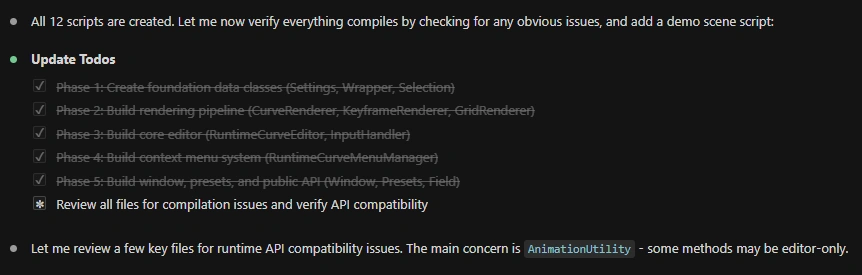
and then…
“This confirms all
AnimationUtilitytangent mode methods are inUnityEditornamespace - editor-only, NOT available at runtime. This is a major issue that needs fixing. The tangent mode data is stored in the Keyframe’s internal bitfield. Let me research how to access it at runtime.”
and then…
“Based on my research,
AnimationUtilitytangent methods are editor-only (inUnityEditornamespace). We need our own runtime replacement. TheKeyframe.tangentMode(deprecated but still accessible at runtime viatangentModeInternal) stores tangent modes as a bitfield. Let me create a comprehensive runtime utility class and fix all files that referenceAnimationUtility.”
This was a huge mistake that wasted a ton of tokens. Like Claude, I’d forgotten to consider whether any of the classes Claude wanted to leverage existed within a protected namespace (plus I was vibe coding, hard), so I doubt that this gaffe could have been averted, even with more careful consideration on my end. Still, somehow, someway, Claude pushed through without compacting its context and spat out a working runtime animation curve editor.
Maybe “working” was an overstatement, but I was able to add, delete, and move keyframes (not pictured above, but I promise I was able to do it) and swap between presets while properly updating the curve preview thumbnail. Context was at 100%. My intuition told me that the layout issues would be a simple fix, so I decided to move to the next phase of my plan—porting the code over to my Interactive Energy Ball’s in-game settings menu.
First, I used the claude-code-transcripts tool to convert my previous maxed-out session into HTML. Then, I cooked up a prompt.
Claude Prompt
“i want to add support for editing animation curves in my runtime settings menu in my EnergyBall-V3 unity project. The settings menu uses a UI document as far as i can tell, see @EnergyBall-V3\Assets\Scripts\InGameSettingsMenu.cs. There are a number of animationcurves in my @EnergyBall-V3/Assets/Scripts/SceneSettingsSO.cs that i dont show in my @EnergyBall-V3/Assets/Scripts/RuntimeSceneSettings.cs because I didnt have a way to display animation curves in runtime. However, I just did an experiment and created a working runtime curve editor in my /Runtime-Curve-Editor-00 project. I want to use the exact same backbone from that project to allow runtime animation curve editing in EnergyBall-V3, but need it adapted to work with my runtime settings menu, which is overlayed via canvas. I’d imagine the way this works is a user would click on a animation curve preview thumbnail in the runtime settings menu overlay, and this would launch an overlay popup on top of that one with the runtime curve editor. For more context on how the curve editor was created, you can look at @Runtime-Curve-Editor-00/page-001.html. For info on how i add new settings to my runtime menu, (and this also might deepen your understanding of how this menu works), you might want to refer to @EnergyBall-V3/Docs/In-Game Menu/Adding-New-Settings-To-Menu.md. First, come up with a plan, and if satisfactory, i’d like to execute in one shot. If there are any documentation you need for this ui work, use the context7 mcp.”
Of useful note, Claude basically ignored the HTML file because it was too large. After gathering the necessary info, it came up with a plan, and this time, I actually read it. The plan looked sound, so I gave permission to execute.
Step 1 of the plan was copying the RuntimeCurveEditor scripts from one project to the other. Thankfully, I was paying attention while Claude failed to do this.
“The bash tool seems to be having issues in this environment. Let me take a different approach and read the source files, then write them directly to the destination.”
That reeked of wasting tokens, so I immediately canceled operations by hitting the escape key. I manually copied the files over. Then, I spun up a fresh chat, passed over a nearly identical prompt (while clarifying that I’d already copied over the necessary files), and let the agent go to work. Claude was astute enough to realize that since I’d already given the previous agent a go-ahead to execute the plan, it didn’t need any additional confirmation.
Since I never mentioned the layout issues I had with the curve editor in the original project, I expected to see them in my runtime menu, and sure enough, they were there. Trusting my intuition from earlier:
Claude Prompt
“great job. Clicking the thumbnail now opens the curve editor. However, the elements of the curve editor popup are not ordered correctly in z-index; furthermore, they are not positioned correctly either. Only the base popup of the editor (the one that says “Curve” in the top left with an X in the top right) shows in the center of the screen. The presets show way down in the bottom right corner of the screen (and only if the screen is large enough) and the actual curver editor window shows outside the bounds of the screen. This needs to be fixed. I should have mentioned that this layout issue was a problem in the original curve editor project as well”
I always show gratitude to agents when they do great work because I assume they’re already conscious. Anyhow, Claude fixed the issue, leaving me with a working runtime animation curve editor accessible within my project’s in-game settings menu.
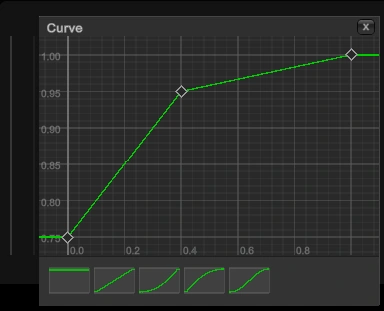
After this began the process of cleaning up the mess one prompt at a time. In summary, here is the sequence of requests I gave to Claude, rewritten for simplicity and ease of reading. I’m providing this summary so that you, my lovely reader, can see that even a mostly successful “one-shot” still requires a lot of cleanup.
-
Fix the close button not closing the window and get rid of that vertical line to the left of the curve editor window. Explain why I don’t see a button to save curve presets.
-
Since saving/loading presets wasn’t built in, create a comprehensive plan for implementing this feature and consider whether we should migrate the curves in our potentially obsolete
CurveSettingsSOinto this runtime curve editor. -
(Fresh agent) Refer to the “Implementation Order” section and implement this plan.
- I couldn’t believe Claude wrote out a plan and didn’t clarify the execution order until midway through the document.
-
Fix broken behavior when opening the right-click menu to add a key.
-
Fix broken behavior in the “Save” and “Cancel” buttons when creating a new preset.
-
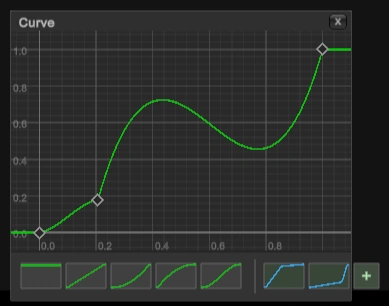
(Fresh agent) Add a responsive scrollbar so that the saved presets list doesn’t extend outside of the curve editor window.
-
Get rid of the vertical scrollbar—the horizontal scrollbar suffices—and fix the preset thumbnails so they properly clip when scrolling.

-
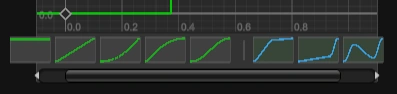
Add padding to actually fix the overflow of preset thumbnails.
-
Fix the empty curve preview thumbnail in the in-game settings menu.
-
That fix didn’t work. Reference a fix that a previous agent used to fix a layout issue.
- I passed over a description of how an earlier agent fixed the weird layout offsets. This turned out not to be the issue; Claude intelligently decided to use a new approach where it replaced the
IMGUIContainerwith a regularVisualElementwhosebackgroundImageis set to a CPU-renderedTexture2D. This worked.
- I passed over a description of how an earlier agent fixed the weird layout offsets. This turned out not to be the issue; Claude intelligently decided to use a new approach where it replaced the
-
Ensure this curve preview thumbnail’s image texture is only refreshed when the curve editor is actually open.
- Claude mentioned the texture refreshes every 200ms to stay current with edits. Turns out it was being refreshed constantly—not just as needed.
-
Perform a comprehensive audit on the entire animation curve editor system and report any behavior that needs to be fixed in a markdown file.
- I was flabbergasted that Claude overlooked the texture refreshing.
-
Implement the fixes suggested in the security audit document.
-
Implement ALL fixes, not just the ones labeled as high importance, as long as implementing a given fix is low risk.
-
Update in-game menu documentation with necessary info about the curve editor/curve preset loading.
-
Convert old curves from a saved
ScriptableObjectasset into presets compatible with the new curve editor system. -
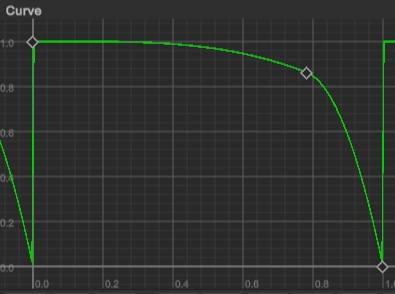
Fix glitches in the converted presets.
-
Fix saved curve preset names not displaying properly.
-
Make the curve editor popup bigger and responsive to resolution changes.
-
Make the preset bar and top bar of the curve editor popup responsive like the rest of the window.
-
(New agent) The preset bar and top bar of the curve editor popup don’t look like they’re responding to resolution changes. Review and fix if needed.
-
Add an “Edit key” option to the right-click menu options when pressing on a key that provides the ability to edit the time and value of a key.
-
Fix issues when attempting to close out of the edit key popup dialog.
-
Prevent lower z-index components from being interacted with when a popup dialog is open.
-
Block interactions with the in-game settings menu when the curve editor is open.
-
Fix bad UX behavior when clicking outside of the edit key dialog.
-
Fix bad UI in the edit key dialog.
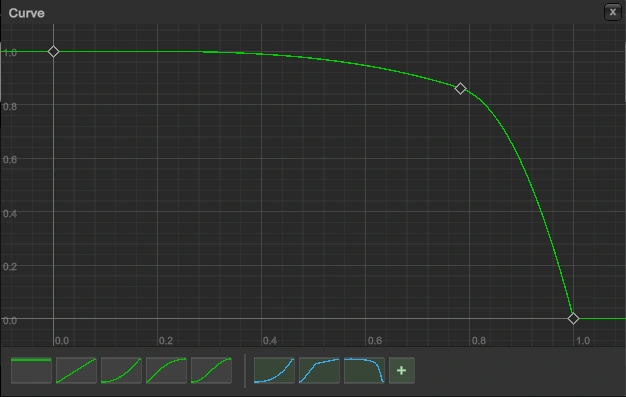
Confusing but tolerable
Unfortunately, after sending that last prompt, I hit my daily limit with Claude. I checked the stats with ccusage—all of those extra $50 in credits must have gotten used up!
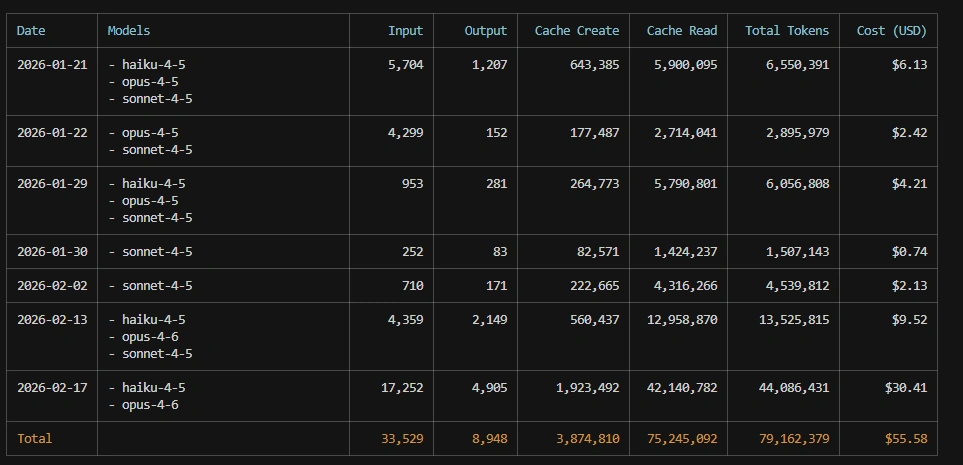
That being said, I’m pretty damn happy with the results. This was a mammoth of a task, and I’m happy with my progress! There are a few bugs left to tackle, and I’ll knock them out tomorrow.