I was tired of .DS_Store files ending up in this blog’s media folder in my Google Drive. I had a silly error in my media-filters blacklist where everything got marked as okay to sync at the very top, so none of the blacklist even got processed. Sheesh.
I just wasted a lot of time (and Claude credits) trying to get the Unity MCP from Coplay set up for my project. I ended up in a ridiculous loop with Claude; it would tell me I needed to restart our active chat session in order for it to gain permission to invoke the MCP tools, yet restarting Claude would cause the MCP server to shut down, thereby requiring me to restart the server after already having a Claude session open, which would prevent Claude from having access to the MCP tools. After exhausting my daily credits, I tried out the MCP in Cursor instead, where it worked seamlessly.
Do I even need a Unity MCP? No, I really don’t—at least until editing VFX graphs is supported. But since everything seems to just work with Cursor, I felt inspired to take another crack at configuring Cursor to work with Unity projects. Being out of daily Claude credits, I turned to Cursor’s default agent for this; and, though it took close to 45 minutes of back-and-forth chatting and testing, I finally got things right. It turns out I don’t even need Visual Studio’s “Game development for Unity” workload. Most helpfully, Anysphere, the company behind Cursor, now offers its own C# package. Squeeze on that, Microsoft. To be totally positive I actually had Cursor integration down pat, I tested out the process on a second PC, and it worked.
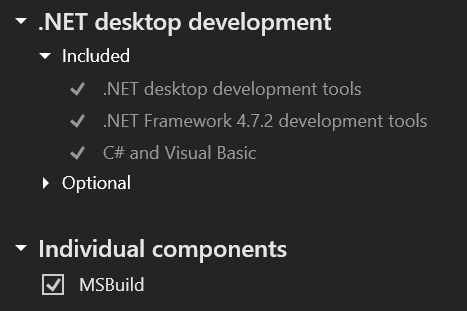
For reference, here’s what’s needed from the Visual Studio installer:
I finally added a reference to all the Obsidian plugins I use for this blog inside the project repo. Unfortunately, it seems there’s no way to auto-suggest plugin installations in Obsidian like in Visual Studio, but documenting the plugins at least ensures I won’t need to check one of my other computers next time I need to set up this blog project from scratch.
I’d love to start working on the actual project in Unity now, but it’s already getting late. Guess today was just another one of those setup days.
Tags: file-management gdrive mcp claude unity workflow documentation