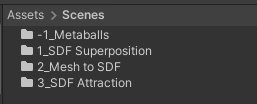
Wrapped up my Mesh-to-SDF testing and took time to prepare for the next phase, SDF attraction testing. While organizing my project, I came up with a naming convention syntax to better sort through files. I’ll document it here for reference.
- Place each scene + scene-specific assets in a separate folder in Assets/Scenes
- Append the scene name with a number prefix referencing the order of the scene’s creation relative to other scenes.
- Ex. A scene named “Mesh to SDF” gets placed inside a folder called “2_Mesh To SDF” (because this was the second scene I created in the project).
- Mark abandoned scenes by using a negative number for the order of creation.
- Ex. The abandoned “Metaballs” scene gets placed in a folder called “-1_Metaballs”. The abandoned scene naming also follows a sequential order (the next one would be -2).
- Append the scene name with a number prefix referencing the order of the scene’s creation relative to other scenes.
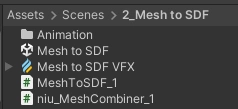
- Each scene’s controller script is named “SceneName_ScriptVersion#”
- Hoping this motivates me to save old scripts instead of overwriting/erasing old code.
- Any script not in use gets appended with the “niu” prefix in the script file name.
- Ex. “MeshCombiner_1” renamed to “niu_MeshCombiner_1”.
- All scene’s animation files are placed in Assets/Scenes/SceneName/Anim
- Animation files are named according to their scene.
- Ex. A sphere animation in the “Mesh to SDF” scene is named “MeshToSDF_sphereAnim” and the sphere controller is named “MeshToSDF_sphereController”.
- Scene-specific VFX Graphs are named according to their scene.
- Ex. “Mesh to SDF VFX”